
Link Gmail tickets to Jira issues
Keeping’s Jira integration puts Jira in the Gmail sidebar. Link a support ticket to the issue that tracks it, or create a new issue from the email, and see where it stands before you reply.

What the Jira integration does
Bug reports and feature requests arrive by email, but engineering works in Jira. Keeping turns your shared Gmail inbox into a help desk, and the Jira integration connects each of those tickets to the Jira issue where the work is planned and tracked.
From any ticket in Gmail you can find a Jira issue by its key or by keyword and link it, or create a new issue in the project of your choice. Keeping shows the issue’s key, summary and status on the ticket, and adds a link back to the conversation in Jira. Support stays in Gmail, engineering stays in Jira, and each side can find the other in one click.
Bridge support and development
Link each customer email to the Jira issue that tracks the fix. Support can see where the work stands, and engineers can open the original conversation from the issue, so the customer’s own words travel with the bug.
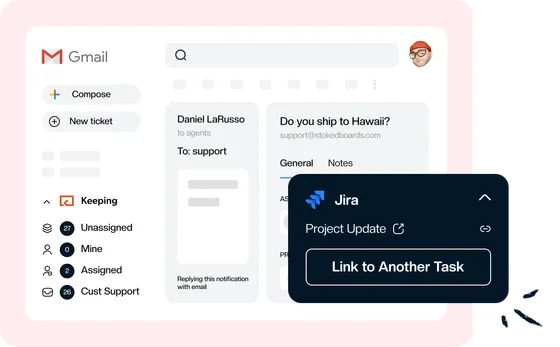
Find issues without leaving your inbox
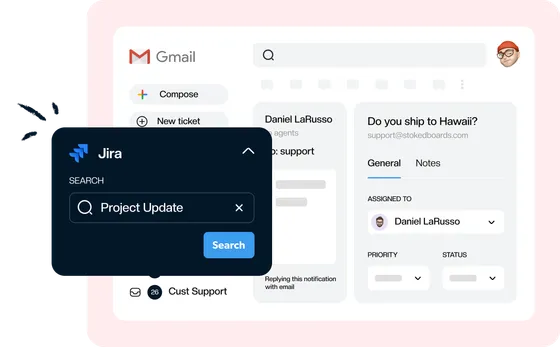
Look up an issue by its key, such as PT-5, or search by keyword from the Keeping sidebar, and attach it to the ticket in two clicks. No switching tabs, no copying links between apps.
Turn customer feedback into issues
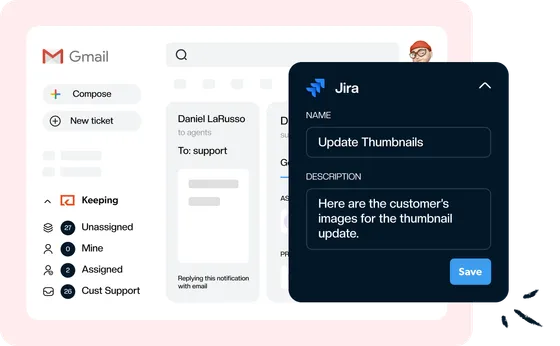
When a bug report or feature request comes in, create the Jira issue from the ticket, in the project where your developers already work. The issue is linked to the email the moment you save it.
Keep everyone in the loop
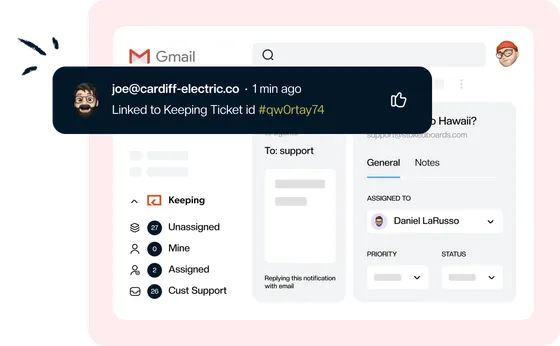
Every linked issue carries a Keeping Ticket link back to the conversation, so whoever picks up the work can read what the customer actually reported instead of a summary.
See it in Gmail
What the integration looks like in the Keeping sidebar and in Jira, in screenshots from the product.
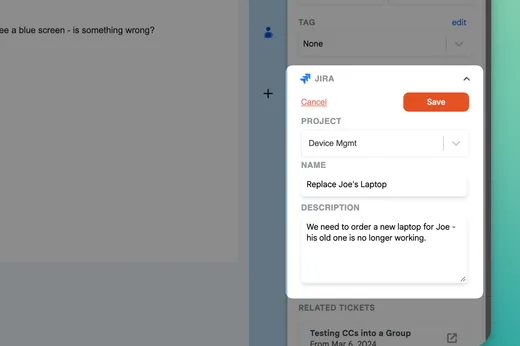
Turn an email into a Jira issue
Open the Jira section in the Keeping sidebar, choose Add New, pick the project, give the issue a name and a description, and save. Keeping links the new issue to the ticket straight away.
- Keeping remembers the last project you used
- New issues are created with the Task issue type
- Set the assignee, priority and sprint in Jira
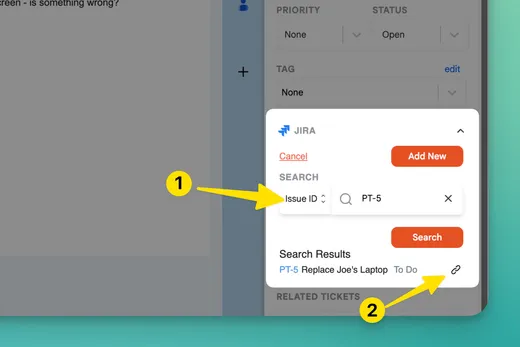
Link a ticket to an issue that already exists
Switch the search to Issue ID and enter a key such as PT-5, or search by text, then click the link icon next to the right result.
- Link more than one issue to a ticket
- Link one issue to every ticket about the same bug
- Any agent can link and create issues once Jira is connected
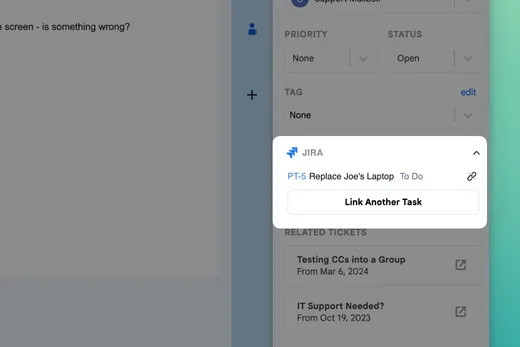
See the issue’s status before you reply
Every linked issue shows on the ticket with its key, its summary and its current status, and the key opens the issue in Jira. Keeping reads it from Jira rather than keeping its own copy.
- The Jira section opens by itself on tickets with linked issues
- Answer “is it fixed yet?” emails without asking engineering
- Unlink an issue in one click; nothing changes in Jira
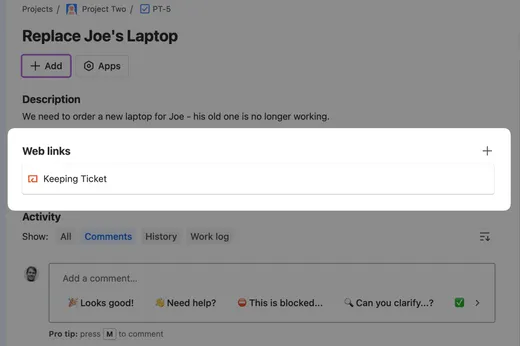
A link back to the conversation
When you link or create an issue, Keeping adds a Keeping Ticket link to it that opens a read-only view of the conversation.
- Added for issues you link and issues you create
- Email replies, notes and attachments stay in Keeping
- Resolving the issue in Jira doesn’t close the ticket
How to connect Jira to Keeping
A Keeping admin connects Jira once for the whole team. After that, every agent sees a Jira section in the Keeping sidebar, with nothing else to set up.
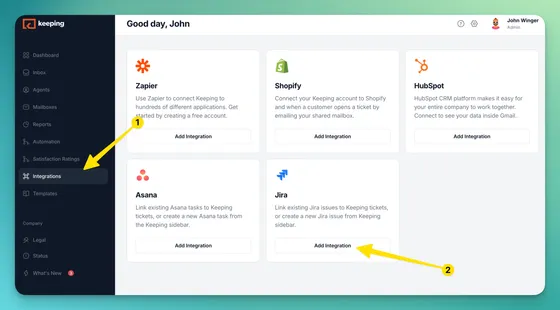
- Step 1: Open Integrations. In the Keeping web app, choose Integrations from the left-hand menu.
- Step 2: Add Jira. Click Add Integration on the Jira card, sign in to Jira and allow Keeping access.
- Step 3: Open a ticket in Gmail. A Jira section now appears in the Keeping sidebar on every ticket, for every agent.
- Step 4: Link or create an issue. Click Link To Task, then search for an existing issue or choose Add New.
Ways teams use Keeping with Jira
The integration does one job, connecting a ticket to an issue, and it fits any team that answers email and ships work through Jira.
Send bug reports to engineering
A customer reports a bug by email. Create an issue in the engineering project with the steps to reproduce, and check its status on the ticket before you tell the customer it’s fixed.
Customer support in GmailGroup duplicate reports under one issue
When ten customers write in about the same outage, link every ticket to the one Jira issue. Engineers see the conversations behind it, and support knows exactly who to update.
Collaborate in GmailHand feature requests to product
Link a customer’s request to the issue on the backlog. When it ships, support can find every ticket that asked for it and write back.
Help desk for GmailRoute IT work that needs a change
An access request or a system change needs more than a reply. Log it as an issue in the IT project and keep the employee’s email tied to it until the work is done.
IT help desk in Gmail
Jira integration FAQ
Which Keeping plans include the Jira integration?
Integrations, Jira included, are part of the Advanced and HIPAA plans. The Essentials plan doesn’t include integrations. Compare what each plan includes on our pricing page.
Who can connect Jira to Keeping?
A Keeping admin connects Jira once, for the whole team. Agents who aren’t admins see the Add Integration button greyed out with “Only admins can install the app”, and once Jira is connected every agent can link and create issues from the sidebar.
Can I search for a Jira issue by its key?
Yes. Switch the search to Issue ID and enter the key, such as PT-5, or leave it on Text to search by keyword.
What issue type does Keeping create?
New issues are created as Tasks in the project you pick, with the name and description you enter. Change the issue type, assignee or sprint in Jira.
Can I link one Jira issue to several tickets?
Yes. Link the same issue to every ticket about the same bug, and link more than one issue to a single ticket when an email needs two pieces of work.
Do changes in Jira update the ticket?
No. The ticket shows the issue’s current summary and status whenever you open it, but resolving or editing an issue in Jira doesn’t close, reopen or change the ticket.
What happens when I unlink an issue or disconnect Jira?
Unlinking removes the link from the ticket and leaves the Jira issue as it is. Disconnecting Jira from the Integrations page removes every Jira link from your Keeping tickets; the issues in Jira stay.
Join the thousands of users that are sharing inboxes with Keeping!
Every day, 2,000+ customers trust Keeping to sync and share their mailboxes. Setup takes minutes, and there's no credit card to get started.
Our customers love us for a reason
Don’t just take our word for it, see what our customers are saying about us.


Rated 4.5 /5 on G2

“Our HR department uses Keeping, and it works amazingly well for us to keep organized. It's a simple but robust ticketing system.”
Lisa P. - HR Manager “I like that we can use it right inside our Gmail. I also like that we can assign and prioritize incoming requests.”
Jennifer B. - Human Resource Director “Keeping makes it simple to stay on top of our work orders, and I love that it is integrated with Gmail.”
Lee D. - Technology Coordinator "Tried them all - Keeping is perfect for our startup. Exactly the features we needed, like Gmail integration and collision detection."
Fred D. - COO “Keeping helps our customer service team stay on top of inquiries & recognize when an issue has been handled.”
Jordan P. - Marketing Director “It's a great tool to track and share support emails with other colleagues. I love how Keeping email has its own inbox inside Gmail.”
Natasha H. - Director, IT “Keeping seamlessly integrates with Gmail, so we don't have to work with another tool. It allows everyone to see responses from the team.”
Ravi R. - Chief Product Officer “Seeing our shared mailbox right in GSuite, the automatic setup, and the ability to keep track of issues are my favorite features.”
Matthew D. - IT Manager “At our university, Keeping gives us control over the responses of all our agents, as well as ensuring that all emails are being responded to.”
Marcelo G. - Director, University