
See Shopify orders beside every Gmail ticket
Keeping’s Shopify integration shows the customer’s Shopify history in the Gmail sidebar, from when they first bought and what they have spent to their latest orders and tracking numbers, so you can answer “where is my order?” without opening Shopify.

What the Shopify integration does
Most e-commerce support email is about an order. Keeping turns your shared Gmail inbox into a help desk, and the Shopify integration puts the customer’s store history next to each conversation, so the answer is already on screen when the email opens.
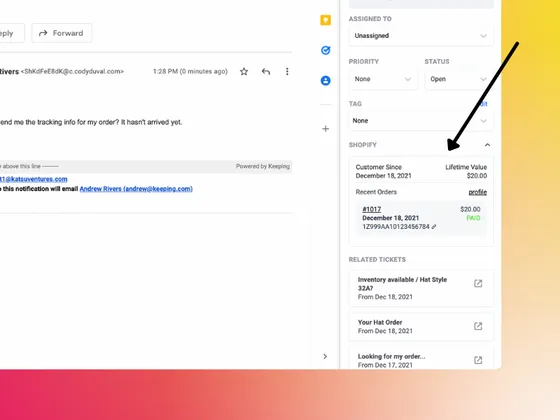
Keeping matches the customer’s email address to a Shopify customer and shows when they first bought, their lifetime value and their three most recent orders, each with its total, payment status and tracking numbers. Order numbers and the customer profile link straight to your Shopify admin. The integration only reads from Shopify; it never changes your store.
Prioritize loyal customers
When a customer emails, see the date they first bought from you beside the conversation, and give long-time customers the attention they have earned.
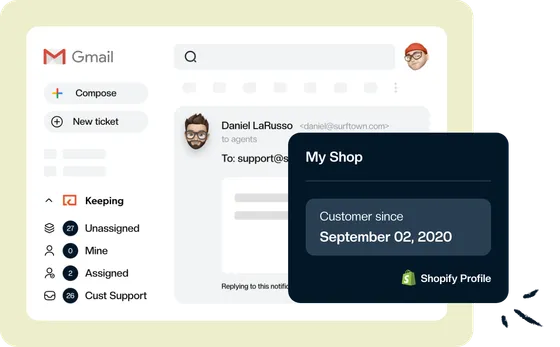
Keep your best customers happy
See a customer’s lifetime value right inside Gmail. Want more detail? Their Shopify customer profile is one click away.
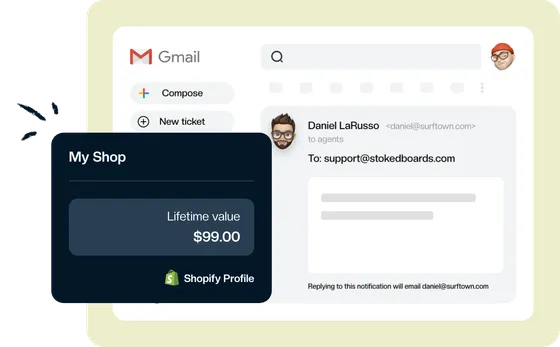
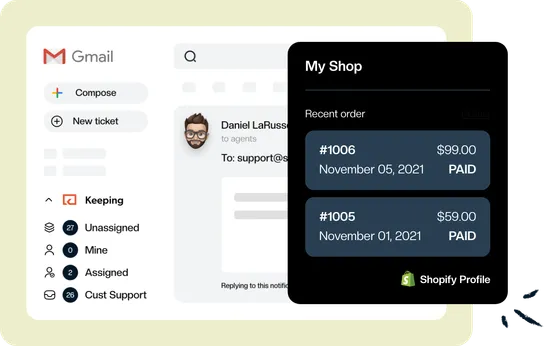
View Shopify orders in Gmail
The customer’s three most recent orders sit beside the email, with the order number, date, total and payment status. Click an order number to open it in Shopify.
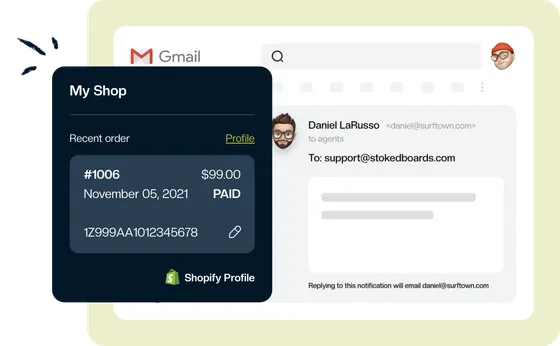
Tracking numbers at your fingertips
See the tracking numbers for each recent order right inside Gmail, and copy one into your reply with a single click.
What agents see in the sidebar
Keeping matches the ticket to a Shopify customer by their email address. Here is everything the Shopify section shows.
- Customer. Customer since, lifetime value, and a link to their profile in your Shopify admin.
- Recent orders. The three most recent, each with its order number, date, total and payment status. The order number opens the order in Shopify.
- Tracking. Every tracking number on the order, with a button to copy it.
- Freshness. Keeping refreshes the data from Shopify as emails arrive, and again whenever it is more than 15 minutes old when you open the ticket.
How to connect Shopify to Keeping
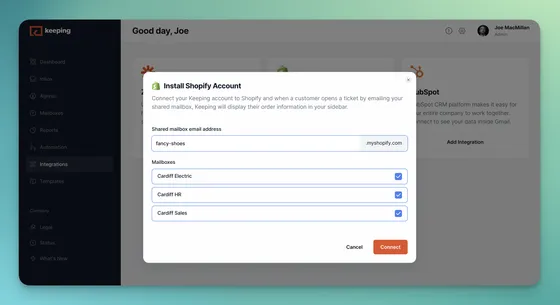
A Keeping admin connects each Shopify store once and chooses which shared mailboxes show its data. Keeping asks Shopify for read-only access to orders and customers.
- Step 1: Open Integrations. In the Keeping web app, choose Integrations from the left-hand menu and click Add Integration on the Shopify card.
- Step 2: Enter your store and mailboxes. Type your store’s myshopify.com address and tick the mailboxes that should show Shopify data.
- Step 3: Approve access in Shopify. Click Connect, sign in to Shopify and approve Keeping’s read-only access to orders and customers.
- Step 4: Open a ticket in Gmail. Emails in those mailboxes now show the customer’s Shopify history in the Keeping sidebar.
Ways stores use Keeping with Shopify
The integration puts order history where your team answers email, which is where most e-commerce support starts.
Answer “where is my order?” in one reply
The latest order and its tracking number are beside the email. Copy the tracking number into your reply and close the ticket.
E-commerce support in GmailSpot your best customers
Lifetime value and first purchase date show on every ticket, so a customer with years of orders gets the white-glove answer.
Customer support in GmailHandle refunds and returns faster
Open the order in Shopify straight from the ticket to process the refund or return, then reply from the same Gmail thread.
Simple and streamlinedRun support for more than one store
Connect each store and choose which mailboxes it applies to, so every brand’s inbox shows its own customers’ orders.
Multiple inboxes in Gmail
Shopify integration FAQ
Which Keeping plans include the Shopify integration?
Integrations, Shopify included, are part of the Advanced and HIPAA plans. The Essentials plan doesn’t include integrations. Compare what each plan includes on our pricing page.
Who can connect Shopify to Keeping?
A Keeping admin connects each store and chooses which mailboxes show its data. Every agent working in those mailboxes then sees the Shopify section in the sidebar.
Can Keeping change anything in my Shopify store?
No. Keeping asks Shopify only for read access to orders and customers. To refund, cancel or edit an order, open it in Shopify from the order number in the sidebar.
How does Keeping find the right customer?
By the customer’s email address. If no Shopify customer uses that address, the sidebar says Customer Not Found.
How many orders does the sidebar show?
The three most recent, with order number, date, total, payment status and tracking numbers. The customer profile link opens their full history in Shopify.
Can I connect more than one Shopify store?
Yes. Connect each store separately and choose the mailboxes for each one. If a customer has orders in more than one store, the sidebar shows them together.
How up to date is the order information?
Keeping refreshes it from Shopify when an email arrives, and again whenever it is more than 15 minutes old when you open the ticket.
Join the thousands of users that are sharing inboxes with Keeping!
Every day, 2,000+ customers trust Keeping to sync and share their mailboxes. Setup takes minutes, and there's no credit card to get started.
Our customers love us for a reason
Don’t just take our word for it, see what our customers are saying about us.


Rated 4.5 /5 on G2

"Tried them all - Keeping is perfect for our startup. Exactly the features we needed, like Gmail integration and collision detection."
Fred D. - COO “I like that we can use it right inside our Gmail. I also like that we can assign and prioritize incoming requests.”
Jennifer B. - Human Resource Director “At our university, Keeping gives us control over the responses of all our agents, as well as ensuring that all emails are being responded to.”
Marcelo G. - Director, University “Keeping makes it simple to stay on top of our work orders, and I love that it is integrated with Gmail.”
Lee D. - Technology Coordinator “Our HR department uses Keeping, and it works amazingly well for us to keep organized. It's a simple but robust ticketing system.”
Lisa P. - HR Manager “Keeping helps our customer service team stay on top of inquiries & recognize when an issue has been handled.”
Jordan P. - Marketing Director “It's a great tool for tracking and sharing support emails with colleagues. I love how Keeping email has its own inbox inside Gmail.”
Natasha H. - Director, IT “Keeping seamlessly integrates with Gmail, so we don't have to work with another tool. It allows everyone to see responses from the team.”
Ravi R. - Chief Product Officer “Seeing our shared mailbox right in GSuite, the automatic setup, and the ability to keep track of issues are my favorite features.”
Matthew D. - IT Manager