
Connect Keeping to 5,000+ apps with Zapier
Keeping’s Zapier integration sends your Gmail help desk’s events to the rest of your stack. When a ticket arrives, a customer or agent replies, a note is added, a ticket is assigned or its status changes, a Zap can post to Slack, add a row to Google Sheets or update your CRM.

What the Zapier integration does
Keeping turns your shared Gmail inbox into a help desk. The Zapier integration lets everything else you use hear about what happens there, without a developer. Keeping is a trigger app on Zapier with six triggers, and each Zap watches one shared mailbox.
Data moves one way, from Keeping to your other tools. Zapier can’t create or update tickets in Keeping. Each trigger sends the ticket’s subject, customer email, status, priority, tags, assignees, mailbox and a link to the ticket, so the Zap has what it needs to post a message, add a row or update a record.
Ways teams use Keeping with Zapier
A few of the workflows teams build on Keeping’s triggers.

Tell Slack when a ticket arrives
Post new tickets to a support channel with the subject and a link, or message the agent a ticket was just assigned to.
Collaborate in Gmail
Log every ticket in Google Sheets
Add a row for each new ticket, or each status change, and build your own reports on top of Keeping’s own.
Best-in-class analytics
Keep your CRM up to date
Create or update a person in Pipedrive or another CRM when a customer opens a ticket, so sales sees who has been in touch.
Customer support in Gmail
Start work in your project tool
When a ticket is assigned, create a task in Trello or Asana for the follow-up work, with the ticket link attached.
Automate everything
Connect your apps and automate workflows
Zapier connects Keeping with thousands of apps, so the rest of your tools can act on what happens in your shared inbox, with no code.
Six triggers for your Zaps
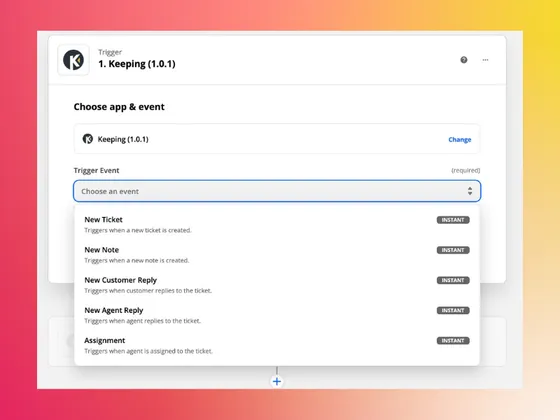
Pick Keeping as the trigger app in Zapier and choose the event that starts your Zap. Each trigger watches one shared mailbox.
- New Ticket. A new conversation starts in the mailbox, from a customer or an agent.
- New Customer Reply and New Agent Reply. Someone replies on an existing ticket.
- New Note. A teammate adds a private note, and the Zap gets the note text.
- Assignment. A ticket is assigned to a teammate.
- Status Changed. A ticket’s status changes, by hand, by a reply, or by a workflow or SLA.
Get going quickly with Zapier’s pre-built integrations
Easy automation for busy people. Zapier moves info between your web apps automatically, so you can focus on your most important work.

Create Google Sheets rows for new Keeping tickets
Keeping + Google Sheets
Details about Create Google Sheets rows for new Keeping tickets
Send channel messages in Slack when new Keeping tickets arrive
Keeping + Slack
Details about Send channel messages in Slack when new Keeping tickets arrive
Create Google Chat messages for new Keeping tickets
Keeping + Google Chat
Details about Create Google Chat messages for new Keeping tickets
Create Pipedrive persons from new Keeping tickets
Keeping + Pipedrive
Details about Create Pipedrive persons from new Keeping tickets
Add new tickets in Keeping to HubSpot
Keeping + HubSpot
Details about Add new tickets in Keeping to HubSpot
How to connect Zapier to Keeping
Zapier signs in to Keeping with your company’s API key. Only a Keeping admin can generate it, and one key serves every Zap your company builds.
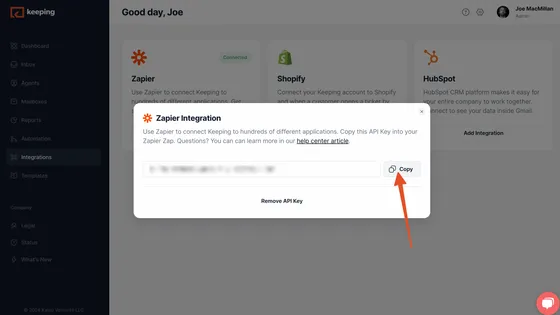
- Step 1: Generate your API key. In the Keeping web app, open Integrations, click Add Integration on the Zapier card, and copy the API key. Keep it secret; it gives access to your ticket data.
- Step 2: Create a Zap. In Zapier, create a Zap, search for Keeping as the trigger app and choose a trigger event.
- Step 3: Sign in to Keeping. When Zapier asks, paste the API key to connect your Keeping account.
- Step 4: Pick a mailbox and test. Choose the shared mailbox to watch and test the trigger; Zapier pulls the latest matching ticket as sample data.
Zapier integration FAQ
Which Keeping plans include the Zapier integration?
Integrations, Zapier included, are part of the Advanced and HIPAA plans. The Essentials plan doesn’t include integrations. Compare what each plan includes on our pricing page.
Can Zapier create or update tickets in Keeping?
No. Keeping is a trigger app on Zapier, so data moves from Keeping to your other tools. Zaps can’t create tickets, reply, or change a ticket’s status, tags or assignee.
Who can generate the API key?
A Keeping admin. There is one key per company; an admin can remove it from the same Zapier card and generate a new one.
Does one Zap cover all my mailboxes?
No. Each trigger watches one shared mailbox, so build one Zap per mailbox you want to automate.
What data does each trigger send?
The ticket’s subject, customer email address, status, priority, tags, assignees, mailbox name, a preview of the latest message, when the ticket was created and a link to it in Keeping. New Note also sends the note text and who was mentioned.
Do emails imported into Keeping trigger Zaps?
No. Past emails that Keeping imports when you connect a mailbox don’t fire New Ticket; only new conversations do.
Join the thousands of users that are sharing inboxes with Keeping!
Every day, 2,000+ customers trust Keeping to sync and share their mailboxes. Setup takes minutes, and there's no credit card to get started.
Our customers love us for a reason
Don’t just take our word for it, see what our customers are saying about us.


Rated 4.5 /5 on G2

“Our HR department uses Keeping, and it works amazingly well for us to keep organized. It's a simple but robust ticketing system.”
Lisa P. - HR Manager “I like that we can use it right inside our Gmail. I also like that we can assign and prioritize incoming requests.”
Jennifer B. - Human Resource Director “Keeping makes it simple to stay on top of our work orders, and I love that it is integrated with Gmail.”
Lee D. - Technology Coordinator "Tried them all - Keeping is perfect for our startup. Exactly the features we needed, like Gmail integration and collision detection."
Fred D. - COO “Keeping helps our customer service team stay on top of inquiries & recognize when an issue has been handled.”
Jordan P. - Marketing Director “It's a great tool for tracking and sharing support emails with colleagues. I love how Keeping email has its own inbox inside Gmail.”
Natasha H. - Director, IT “Keeping seamlessly integrates with Gmail, so we don't have to work with another tool. It allows everyone to see responses from the team.”
Ravi R. - Chief Product Officer “Seeing our shared mailbox right in GSuite, the automatic setup, and the ability to keep track of issues are my favorite features.”
Matthew D. - IT Manager “At our university, Keeping gives us control over the responses of all our agents, as well as ensuring that all emails are being responded to.”
Marcelo G. - Director, University