Freshdesk vs Zendesk is a closer race at the bottom than most comparison pages admit. Freshdesk Growth and Zendesk Support Team both cost $19 per agent a month billed annually, and both give you solid email ticketing for that money. The gap opens on the next plan up.
For a small team that mainly answers email, Freshdesk is the better fit. Freshdesk Pro ($55) adds automatic ticket assignment and multiple SLA policies, while Zendesk keeps SLA policies and skills-based routing for Suite Professional ($115). Zendesk is worth paying for when you need chat, voice and messaging in one workspace, routing by agent skill, or a marketplace with about 1,900 apps.
I wrote this for the owner or support lead at a company of 2 to 15 people who has narrowed the list to these two names. It sticks to the plans a team that size would actually buy, and to the differences you notice in the first year rather than the fifth.
Freshdesk vs Zendesk at a glance
Both are dedicated help desks: email arrives as a ticket, agents answer it in the vendor’s own app, and the customer gets a reply from your support address. Where they differ is how much each plan bundles and how much setup each one expects from you.
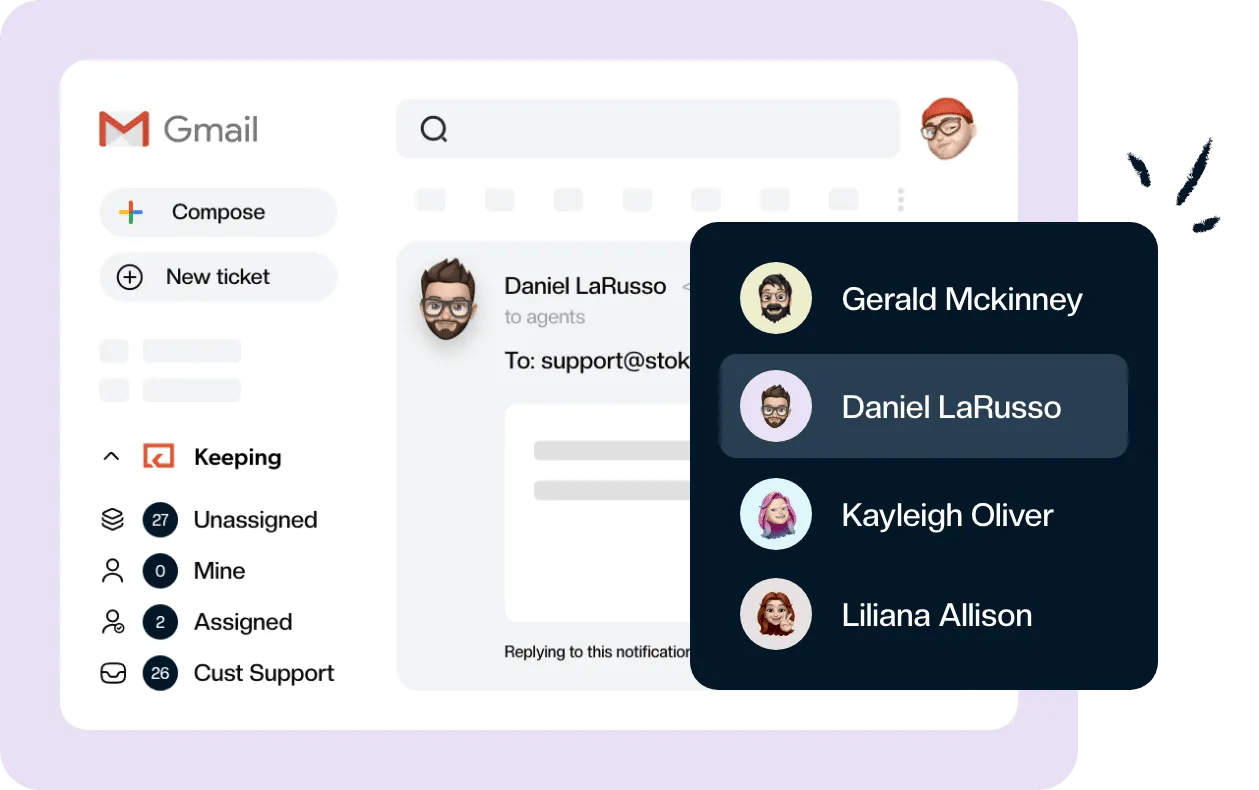
A complete help desk, inside Gmail?
Keeping turns your Gmail into a fully featured help desk. It's not magic, but it feels magical.
| Freshdesk | Zendesk | |
|---|---|---|
| Best for | Small to midsize teams, mostly email, quick to start | Larger or growing teams with several channels and an admin |
| Email-first entry plan | Growth, $19 per agent a month billed annually | Support Team, $19 per agent a month billed annually |
| Omnichannel entry plan | Freshdesk Omni Growth, $29 | Suite Team, $55 |
| AI agent pricing | 500 sessions once per account, then $49 per 100 | Included on every plan, billed per automated resolution |
| Free plan | None | None |
| Free trial | 14 days, on the Enterprise plan | 14 days, on Suite Professional |
| App marketplace | Smaller; no current count published | About 1,900 apps listed |
| Learning curve | Gentle; most teams are answering tickets on day one | Steeper; expect someone to own configuration |
Prices are per agent per month, billed annually. The next section has the full plan map, with monthly prices.
Zendesk vs Freshdesk pricing
Both start at $19 per agent a month billed annually: Freshdesk Growth and Zendesk Support Team. After that, Freshdesk Pro costs $55 for an email help desk with automatic assignment and multiple SLA policies, while Zendesk’s $55 plan, Suite Team, spends the money on chat, voice and messaging. Zendesk’s SLA policies and skills-based routing start on Suite Professional at $115.
All prices below are list prices per agent per month in US dollars, taken from each vendor’s pricing page on October 24, 2026. Freshdesk no longer lists a free plan. Its Growth plan costs $19 billed annually, not the $15 that many comparison pages still quote.
Plan-by-plan pricing
| Tier | Freshdesk | Zendesk |
|---|---|---|
| Email-first entry | Growth: $19 annual, $23 monthly | Support Team: $19 annual, $25 monthly |
| Email-first, more control | Pro: $55 annual, $66 monthly | No email-only plan above Support Team |
| Email-first, top | Enterprise: $89 annual, $107 monthly | No email-only plan above Support Team |
| Omnichannel entry | Omni Growth: $29 annual, $35 monthly | Suite Team: $55 annual, $69 monthly |
| Omnichannel, mid | Omni Pro: $79 annual, $95 monthly | Suite Professional: $115 annual, $149 monthly |
| Omnichannel, top | Omni Enterprise: $119 annual, $143 monthly | Suite Enterprise: quoted by sales |
| AI copilot add-on | Freddy AI Copilot: $29 annual, on Pro and Enterprise | Copilot: $50 annual, on Suite Professional and above |
| AI agent | 500 sessions once per account, then $49 per 100 sessions | Included, billed per automated resolution |
| Trial | 14 days of Enterprise | 14 days of Suite Professional |
The naming trips people up. Freshdesk is the email and portal help desk, and Freshdesk Omni is a separate set of plans that adds chat, phone and messaging to the same ticket queue. Mismatched comparisons usually come from setting Freshdesk Omni Growth ($29) against Zendesk Support Team ($19), or Freshdesk Pro ($55) against Suite Professional ($115).
Like-for-like, the email plans match at $19, and the omnichannel entry plans are $29 (Freshdesk Omni Growth) against $55 (Zendesk Suite Team). Freshdesk Pro and Zendesk Suite Team cost the same $55 but buy different things: one is a stronger email desk, the other adds channels.
What a five-agent team pays in a year
At list price with annual billing, five agents cost:
- $1,140 on Freshdesk Growth, and the same $1,140 on Zendesk Support Team
- $3,300 on Freshdesk Pro, and $3,300 on Zendesk Suite Team
- $1,740 on Freshdesk Omni Growth, or $4,740 on Omni Pro
- $6,900 on Zendesk Suite Professional
Neither copilot is sold on an entry plan. Freddy AI Copilot needs Freshdesk Pro or Enterprise, and Zendesk’s Copilot needs Suite Professional or above, so a copilot for all five agents puts Freshdesk Pro at $5,040 a year and Zendesk Suite Professional at $9,900.
Two costs sit outside these numbers. Freshdesk’s 500 Freddy AI Agent sessions are a one-time allowance for the account, not a monthly one, so a busy AI agent becomes a $49-per-100-sessions line item quickly. Zendesk bills its AI agents per automated resolution, and that rate is not printed on the main pricing page, so ask for it before you switch the agent on.
Ease of use and setup
A small team can usually answer real tickets in Freshdesk on its first afternoon, without anyone opening the documentation. The interface is bright and fairly flat, and the defaults are sensible. Zendesk’s agent workspace is denser, and the things that make Zendesk worth its price (automation rules, queues, routing, multiple brands) need somebody to set them up and look after them. If nobody on your team wants that job, Zendesk tends to drift into a half-configured state that frustrates everyone.
The forum complaints are predictable. Zendesk users grumble about admin overhead and a bill that climbs as features get added. On the Freshdesk side, the usual gripe is that chat and phone mean moving to Omni plans or buying other Freshworks products.
Both trials run for 14 days, and both start you on a top plan (Freshdesk Enterprise, Zendesk Suite Professional). That’s a fine way to explore, but it’s easy to fall for a feature you won’t have on the plan you buy, so keep the pricing table open while you test.
Ticketing, automation and routing
Both tools cover the basics every email ticketing system needs: tickets from email, assignment, canned replies, internal notes, statuses and automation rules. What differs is the plan you need to be on for the features a growing team wants next.
On Freshdesk, Pro is the step that matters. It adds automatic assignment that spreads new tickets across the team and lets you run multiple SLA policies, for example a faster target for paying customers than for free-trial questions. Skill-based routing, which sends a ticket to an agent tagged with the right language or product, is an Enterprise feature.
Zendesk’s Support Team plan already routes tickets and runs automation rules, which is plenty for a handful of agents. SLA policies and skills-based routing both start on Suite Professional, and Zendesk’s plan comparison lists neither on Support Team or Suite Team.
Most teams under ten agents don’t need skills-based routing at all. A couple of rules plus a fair rotation gets you most of the way, and our guide to ticket routing methods shows where each one stops working. SLAs are different. Promising customers a response time is often the reason a small team upgrades, and Freshdesk sells SLA policies on Pro at $55 per agent a month, against $115 for Zendesk Suite Professional.
Chat, phone and messaging
Zendesk is the stronger choice when email is only one of several channels. Suite Team brings messaging, live chat, telephony and routing across all of them into one agent workspace, so a WhatsApp message and an email from the same customer land side by side.
Freshdesk puts these channels on the separate Omni plans, where Omni Growth costs $29 per agent a month against $55 for Zendesk Suite Team. The catch is that the Freshworks lineup is split into more products, and the email-first Freshdesk plans don’t include chat or phone at all. For a team that has, or expects, real chat and voice volume, Zendesk’s single workspace is the more coherent setup.
If your channels are email and a contact form, none of this matters much, and you’d be paying for capacity you won’t use.
Freddy AI vs Zendesk AI
The two vendors price AI in opposite ways. Zendesk includes AI agents on every plan and charges for each conversation the AI resolves without a human. Freshdesk includes 500 Freddy AI Agent sessions once per account, then charges $49 per 100 sessions.
The agent-facing assistants differ in price and in which plan can buy them. Freddy AI Copilot is $29 per agent a month billed annually, available on Pro and Enterprise. Zendesk’s Copilot is $50 per agent a month billed annually, and only Suite Professional and above can add it.
For a small email team, I wouldn’t let AI decide this comparison. AI drafting is turning up in nearly every support tool, and a team that answers support in Gmail already has Gemini for customer support in Gmail in the inbox.
Reporting and integrations
Zendesk has the deeper reporting. Every plan comes with prebuilt dashboards and the higher Suite plans add more analysis, while Freshdesk’s built-in reports are simpler and easier to read, with custom dashboards on Pro.
On integrations, the Zendesk Marketplace lists about 1,900 apps, a little short of the “2,000+” that still gets quoted. Freshworks doesn’t publish a current count for Freshdesk’s marketplace, which is smaller. The integrations most small teams use (CRM, ecommerce, Slack, Jira) exist on both, so check the three you rely on rather than the totals.
What each one means for a team on Google Workspace
Either tool moves the work out of Gmail. Once support@ is connected, Gmail becomes an intake: agents read and reply inside Freshdesk or Zendesk, and customers receive replies sent from your support address through the help desk.
The two part ways on how mail gets in. Freshdesk can connect a Gmail mailbox directly or accept forwarded mail, including from a Google Group. Zendesk’s direct Gmail connection doesn’t work when support@ is a Google Group or an alias, so those teams forward mail to Zendesk. Zendesk’s help center also says it doesn’t officially support Groups or aliases as support addresses, so delivery problems on that path are yours to sort out.
That matters because many small teams run support@ as a Google Groups collaborative inbox. If yours does, and your team would rather keep answering where it already works, see how teams use Gmail as a help desk before you move everyone into a new app.
Which is better, Freshdesk or Zendesk?
Freshdesk is the better choice for most teams of 2 to 15 people whose support is mostly email. It costs the same to start, its $55 Pro plan covers what small teams usually upgrade for, and it asks less of whoever sets it up. Zendesk is better when you run several channels, have someone to administer it, and will use the depth you pay for.
Choose Freshdesk if:
- most of your support is email and a help center
- you want multiple SLA policies without paying $115 per agent
- nobody on the team wants to be a part-time help desk admin
- you would rather add chat later through Omni than pay for it now
Choose Zendesk if:
- chat, phone and messaging already carry real volume
- you need skills-based routing or several brands in one account
- you have an admin who will own the rules, queues and reports
- a specific integration you depend on only exists in the Zendesk Marketplace
If your team answers support@ in Gmail and needs neither chat nor voice, you may not need either of them. A Freshdesk alternative or Zendesk alternative that works inside Gmail keeps assignment, notes and SLAs where your team already reads email. Keeping is one of them. It runs as a simple help desk inside Gmail, starting at $14 per user a month billed annually.
Frequently asked questions about Freshdesk and Zendesk
Does Freshdesk or Zendesk have a free plan?
No. Freshdesk’s pricing page lists only the paid Growth, Pro and Enterprise plans, and Zendesk has no free plan either. Both offer a 14-day trial instead. Freshdesk’s trial runs on its Enterprise plan and Zendesk’s on Suite Professional, so compare what you see in the trial with the plan you would actually buy.
What are the disadvantages of Freshdesk?
Chat, phone and social messaging sit on the separate Freshdesk Omni plans, so the $19 Growth plan is email plus a customer portal. Skill-based routing is Enterprise only. The 500 Freddy AI Agent sessions are a once-per-account allowance, after which you pay $49 per 100 sessions. Its app marketplace is also smaller than Zendesk’s.
Is Freshdesk a good ticketing system?
Yes, for teams whose support arrives mostly by email. Growth covers ticketing, a shared inbox, a customer portal and a knowledge base for $19 per agent a month billed annually, and Pro adds automatic assignment and multiple SLA policies. Teams that need phone and chat in the same queue should price the Omni plans instead.
Is Zendesk or Freshdesk AI better?
The bigger difference is how you pay. Zendesk includes AI agents on every plan and bills each automated resolution, and its Copilot add-on costs $50 per agent a month on Suite Professional and above. Freddy includes 500 AI agent sessions once per account, and its Copilot costs $29 on Pro and Enterprise. Run both trials against your real tickets.
Who are the main competitors to Zendesk and Freshdesk?
Zoho Desk is the third name on most shortlists, with Help Scout, Front and Intercom close behind for particular kinds of team. Teams that answer support from Gmail also look at shared inbox tools that skip the separate app. Decide what your ticketing system has to do first, then compare brands against that list.
How do I migrate from Zendesk to Freshdesk?
Treat it as a project with its own timeline. Tickets, contacts, companies and knowledge base articles can usually move, while automations, SLA policies, canned replies and reports have to be rebuilt. Most teams run both tools side by side for a week or two, sending new email to the new desk while agents close out open tickets in the old one.